
From Shopify order to print-ready file, automatically
A Windows service polls Shopify, downloads customer artwork, runs seven validation checks and drops print-ready files into the RIP hot folder. No hosting, no monthly fee, admin panel included.
Ashraful
Shopify Select Partner
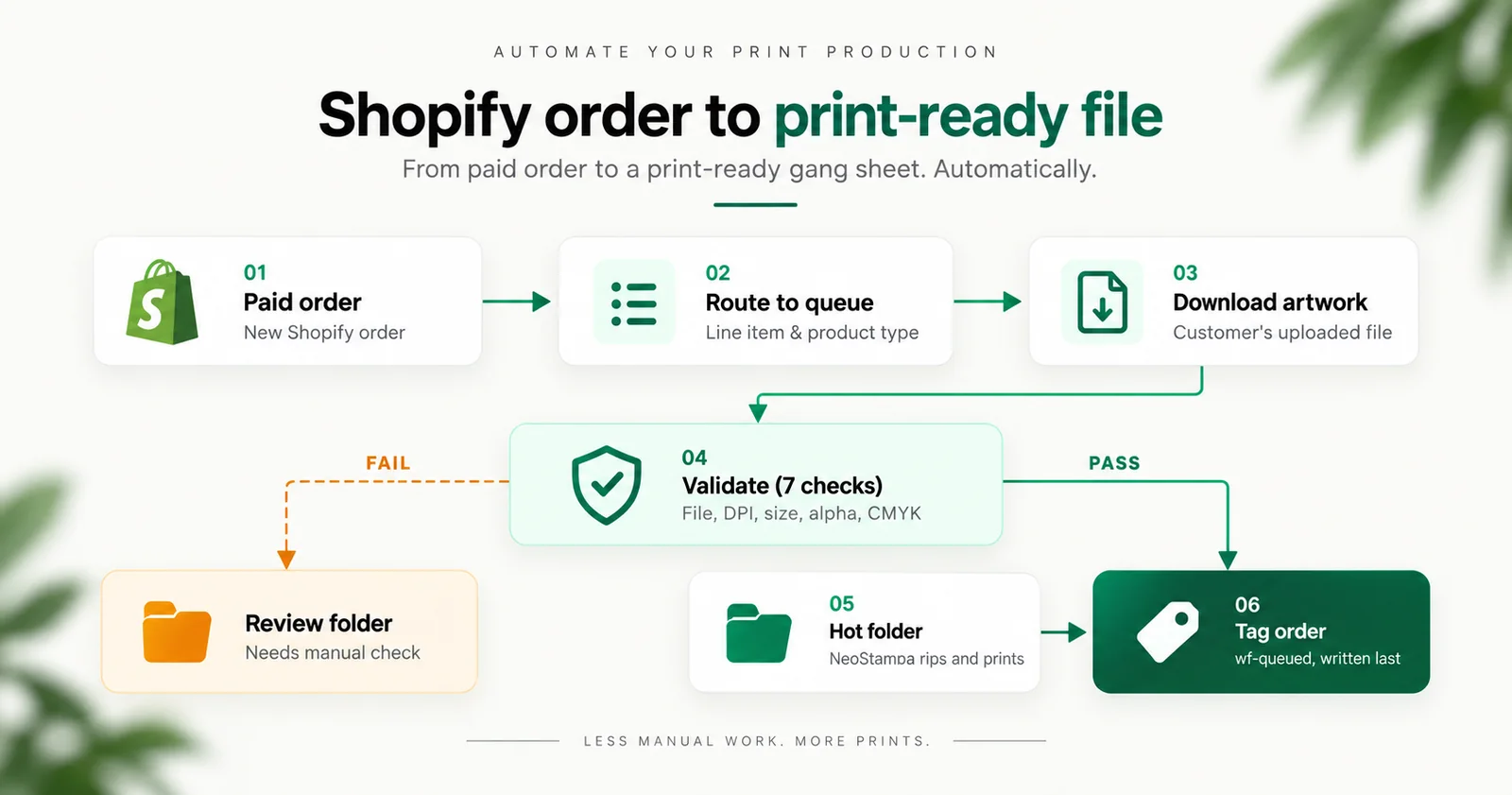
Short answer: a Windows service on the print shop's own RIP machine polls Shopify for paid orders, downloads each customer's uploaded artwork, runs seven validation checks on it, files it into a per-order production folder, and drops the print-ready file into the NeoStampa hot folder. Anything that fails a check goes to a review folder with the reason attached instead of to a printer. We built it for DTF Virginia, who sell custom DTF gang sheets. It runs on the shop's existing PC, so there is no hosting, no domain and no monthly fee, and it ships with an admin panel the shop runs itself.
DTF Virginia sells custom gang sheets. A customer builds their sheet, uploads the artwork, and pays. Then someone at the shop opens the order, clicks the link, waits for a 200MB PNG to download, checks it is the right size, checks it has transparency, renames it, puts it in the right folder, and drags it into NeoStampa.
Per order. All day.
We replaced that with a Windows service that runs on the shop's own RIP machine. This is what it does, and more usefully, the decisions that turned out to matter. Most of them are not the ones you would expect.
The pipeline
In order:
- Poll Shopify for paid orders. Not webhooks, and the reason matters.
- Route each line item to a print queue, by metafield then product type.
- Download the customer's artwork. Gang sheets reach 119 megapixels.
- Validate against seven gates. Nothing is ever auto-repaired.
- Build a production folder named
10432_Whitlock, with paperwork. - Drop the print-ready file into the NeoStampa hot folder.
- Tag the order
wf-queued, last, so a crash reruns cleanly.
Seven steps, one of which is doing most of the work. We will get to validation.
Decision 1: polling, not webhooks
This is the one that surprises people, because webhooks are the obvious answer. Shopify fires an event, your service reacts, no waiting.
The shop PC is off overnight.
Shopify retries a failed webhook for roughly 48 hours and then stops, silently. There is no queue you can drain in the morning, no dead letter you can inspect. The order was placed, the webhook was sent, nothing was listening, and now nothing will ever tell you. You find out when a customer asks where their transfers are.
Polling has a worst case of a late job. Webhooks have a worst case of a lost one.
For a print shop where a missed order means a customer waiting on something that will never arrive, that trade is not close. We poll on a schedule and the PC catches up when it wakes.
The general rule: if the machine receiving your integration is not always on, and is not sitting behind something that buffers for it, webhooks are the wrong shape.
Decision 2: the Shopify tag is the ledger, and it is written last
The service keeps a SQLite database, but it is deliberately not the source of truth. There is no "have we already done this order?" query anywhere in the data layer, and the test suite enforces that there never is.
An order is done if and only if it carries the tag wf-queued in Shopify.
Two things follow, and both matter more than they sound.
The PC becomes replaceable. The shop's machine dies, you install on a new one, and it picks up exactly where the old one stopped. Nothing to restore, nothing to reconcile. State lives in the store, which is backed up by Shopify and visible to anyone with admin access.
Crashes are safe, because the tag is written last. Everything before the tag is repeatable: downloading a file again is harmless, rebuilding a folder is harmless, writing the paperwork again is harmless. If the service dies halfway through an order, that order is still untagged, so the next poll simply redoes it from the start. There is no half-finished state to detect or clean up, because we never create one.
Ordering your writes so the irreversible one happens last is most of what idempotency means in practice.
Decision 3: validation gates the drop, and nothing is ever auto-fixed
This is where the real work is. A file that reaches a printer is film consumed and ink laid down. Getting it wrong is not an error message, it is a physical cost.
Seven checks run before anything reaches a queue:
| Check | Failure reason |
|---|---|
| Magic bytes are a real image or PDF | not_a_file |
| Not an HTML error or login page | gdrive_permission_or_interstitial |
| DPI is at least 300 | low_dpi:<n> |
| Alpha channel present, for DTF, UV and hat patches | no_transparency |
| Fits the roll width for that queue | exceeds_roll_width:<w>x<h>in |
| Colour space is not CMYK | cmyk_input |
| Product maps to a known print queue | no_queue_mapping |
Anything that fails goes to a _REVIEW folder, the order gets wf-needs-review, and the reason is recorded where a human can read it.
The second check earns its place more than any of the others. Customers paste Google Drive links constantly, and a Drive link without public permission does not fail. It returns 200 with an HTML login page. Download it naively and you have a file named artwork.png containing a web page, which fails at the printer instead of at the gate.
Nothing is ever auto-fixed. This was a deliberate argument and it is worth restating, because the instinct runs the other way. Upscaling a 150 DPI file to 300 is one line of code. It also produces a print that looks wrong in a way nobody catches until the customer complains, and by then you have spent the film, the ink and the labour. A file in review costs two minutes of someone's attention. A quietly repaired file costs the job and the relationship.
The one softening: a PNG with no DPI metadata at all is a warning, not a gate. Plenty of perfectly good files omit density. Record it, do not block on it.
Decision 4: routing is configuration, not code
Which printer a product goes to lives in a JSON file the shop can edit:
{
  "queues": {
    "DTF": { "folder": "DTF", "rollWidthIn": 22, "requireAlpha": true, "minDpi": 300 }
  },
  "productTypeFallback": { "DTF Transfers": "DTF" },
  "reviewFolder": "_REVIEW"
}
A line item routes by its custom.rip_queue product metafield first, then by product type fallback, then to review.
There is no fuzzy matching, and that is the deliberate part. DTF Transfers XL will not match DTF Transfers. It goes to review.
That feels unhelpful until you price the alternative. An unmapped product sitting in review costs two minutes. The same product guessed onto the wrong printer costs the film, the job and the customer. Fuzzy matching is a feature that is right 95% of the time in a domain where the 5% is expensive and silent.
The service also refuses to start if the routing file is malformed or a fallback points at a queue that does not exist. Failing at boot is better than failing at 2am on the thirtieth order.
What was the hardest technical problem?
A 22 by 60 inch gang sheet at 300 DPI is about 119 megapixels.
Most image tooling has a guard against decompression bombs, and 119 megapixels trips it. In sharp the fix is limitInputPixels: false, and you need to know to look for it, because the failure presents as a generic processing error rather than "this image is larger than the default limit."
Gang sheets are enormous by the standards of most image pipelines. If you are building anything in this space, assume every default size guard in your stack will need raising, and find them before production rather than during it.
Shipping it in phases
The automatic drop was switched off for the first phase.
Everything ran. Orders polled, artwork downloaded, files validated, folders built, paperwork written. The files stopped in the production folder and an operator moved them the last step into the hot folder.
That is not caution for its own sake. It means the shop watched the system make every decision for weeks, with a human between the machine and the film, before the gate was opened. By the time AUTO_DROP was turned on, nobody was trusting it on faith. They had seen it be right a few hundred times.
There is also a DRY_RUN mode that reads the store and touches nothing: no tags, no metafields, no files dropped. That was how the system first met the real store. It processed the last 60 days of real orders and showed exactly which ones would have needed attention, before anything was installed anywhere. It is also the most honest demo you can give, because you are showing the client their own orders rather than a fixture.
What does the shop get beyond the download?
A scan station. Each barcode scan advances a job through wf-printing and wf-printed. Repeat scans say so calmly rather than erroring.
Refund alerts. An order refunded or cancelled after its file reached a printer gets wf-alert and a log entry naming which files to pull. Film is consumed the moment NeoStampa rips, so this is only worth anything if it is fast. Orders that never left the building are ignored, because an alert that fires on everything gets ignored by people.
Reprints from a local archive, without re-downloading. The original customer link has usually expired by the time anyone wants a reprint. Keeping a permanent local copy is the difference between a reprint and an apologetic email.
Production metrics at /metrics: throughput, review rate, why files fail, and which products cause the most trouble. That last chart is the actionable one. If a third of one product's files fail the transparency check, that is a fix in the product listing, not a printing problem. Products with fewer than three files are hidden, because one bad file out of one is not a 100% failure rate.
What it costs to run: nothing
This is the part merchants are most often surprised by, so it is worth being explicit.
No hosting. The service runs on the PC that is already sitting next to the printer, the one running NeoStampa. There is no server to rent, nothing deployed to a cloud, no bill that arrives whether you used it or not. If the shop is open, it is running.
No domain. The dashboard lives at localhost:8787 on that machine. It never touches the public internet, which also means there is no login to manage, no attack surface facing outward, and nothing to renew annually.
No monthly fee, and no per-order fee. Not a discounted one, not a usage tier. There is nothing subscribed to. A comparable app doing a fraction of this at $99 a month is roughly $3,500 over three years, on a service you would never own and could not modify.
You own it. The source code is handed over on completion, readable and commented, with no licence attached. Any competent developer can maintain it, including one who is not us.
The build is a fixed-price project. After that the running cost is electricity.
The admin panel comes with it
This is not a background service you have to trust blindly. It ships with a dashboard the shop actually uses:
- Live order view. What is queued, what is printing, what needs attention, and why.
- A scan station. Each barcode scan advances a job through
wf-printingandwf-printed. Repeat scans say so calmly rather than erroring. - Review queue. Every file that failed validation, with the exact reason, so someone can fix it or email the customer without guessing.
- One-click reprints from the local archive, without re-downloading. The original customer link has usually expired by the time anyone wants a reprint.
- Production metrics. Throughput, review rate, why files fail, and which products cause the most trouble.
- A daily summary. Counts, what is still outstanding, and the most common issues.
It opens from a desktop icon like any other Windows application. The shop never sees a terminal, never types an address, and never needs to know there is a Node service behind it.
What it runs on
A custom Shopify app, not a public one. No App Store review, no hosting, no monthly fee, no revenue share. It is installed on exactly one store and always will be.
A Windows service, via node-windows, set to Automatic with Delayed Start, because the hot folder drive may not be mounted the instant Windows boots.
The dashboard is a plain local page opened in Edge's app mode, which is a command line flag rather than a framework. Not Electron, not Tauri. Edge ships with Windows, so there is no extra runtime to install, no build step, and nothing additional to keep patched. The shop sees a desktop icon and a window with no address bar. The service does not know or care what is drawing the page.
The whole test suite runs offline against generated fixtures, including deliberately broken files: the wrong DPI, the missing alpha channel, the Google Drive login page. You cannot test the interesting paths of a system like this against real orders, because the interesting paths are the failures.
Where else does this pattern apply?
Most of this is not about DTF.
If you take customer uploads and act on them mechanically, you need a validation gate and you need it to refuse rather than repair. If your integration lands on a machine that is not always on, you want polling. If a crash can leave work half done, order your writes so the irreversible one is last. If a routing mistake is expensive, refuse to guess.
The gang sheet specifics are the easy part. The decisions above are the ones that took the arguing.
We build Shopify automation like this as custom apps: fixed price, source code handed over on completion, no monthly fee and no lock-in. Order-to-production pipelines, file validation, fulfilment integrations, and internal tools that live on your own machines.
Running a print shop, a fulfilment operation, or anything where orders arrive with files attached? Book a free 30 minute call and describe the manual step. We will tell you honestly whether it is worth automating. Or see our app development work. The decisions behind it, separately: why we poll rather than use webhooks, using order tags as the job ledger, and why it needs no hosting.
Frequently asked questions
Can Shopify orders be sent to a printer automatically?
Yes. A service polls Shopify for paid orders, downloads the artwork attached to each line item, validates it, and writes the file into the hot folder your RIP software watches. No plugin does this generically, because the validation rules and the folder layout are specific to your printers and your products, but the pipeline itself is a few hundred lines and it runs on the machine you already have.
Should I use Shopify webhooks or polling for order automation?
Polling, if the machine receiving the work is ever switched off. Shopify retries a failed webhook for roughly 48 hours and then abandons it silently, with no queue to drain and no record to inspect. A print shop PC that is off overnight will lose orders this way. Polling's worst case is a late job; a webhook's worst case is a lost one.
What should be checked before a customer file reaches a printer?
Seven things, at minimum: that the file is genuinely an image or PDF rather than an HTML login page, that its resolution is at least 300 DPI, that it has an alpha channel where transparency is required, that it fits the roll width of the target queue, that it is not CMYK, and that the product maps to a known print queue. Failures should go to a review folder with the reason recorded, never be repaired automatically.
Why not auto-fix a low resolution file?
Because upscaling is one line of code and produces a print that looks wrong in a way nobody notices until the customer complains, by which point the film, ink and labour are spent. A file sitting in review costs two minutes of someone's attention. A quietly repaired file costs the job.
Does this need a public Shopify app?
No. A custom app installed on the one store is the right shape: no App Store review, no policy compliance, no hosting and no revenue share. A public app is only worth building if you intend to sell the automation to other merchants.
How large are DTF gang sheet files?
Large enough to break default tooling. A 22 by 60 inch sheet at 300 DPI is roughly 119 megapixels, which trips the decompression guard in most image libraries. In sharp the setting is limitInputPixels: false. Expect to raise every size limit in your stack.
Does this need hosting or a monthly subscription?
No. It runs on the PC already next to the printer, and the dashboard is at localhost on that machine, so there is no server to rent and no domain to register. There is no monthly fee and no per-order fee, because nothing is subscribed to. The build is a one-off fixed price and the source code is yours on completion. After that the only running cost is the electricity the PC was using anyway.
What does a system like this cost to build?
It is quoted as a custom app build, which for this shape of project typically runs 4 to 8 weeks at a fixed price. There is no monthly fee afterwards, because nothing is subscribed to: the service runs on your own machine and talks to your own store.
About the author
Ashraful
Shopify Select Partner, Top Rated Plus on Upwork. 700+ Shopify projects shipped over 7+ years: themes, apps, migrations, speed, Hydrogen. Solo shop, no agency middlemen.
Read the full storyWorking on a Shopify project?
That's what I do every day. Pick whichever feels lower-friction.
More from the blog
Keep reading
Shopify automation with no hosting and no monthly fee
The monthly fee in most integration quotes is hosting, and hosting exists to accept inbound connections. Reverse the direction and the entire category of cost disappears.
ReadLetting customers upload files on a Shopify product page
Shopify's cart supports file attachments natively and almost nobody knows it. It is free, it works, and it stops at 20MB, which is exactly where print work begins.
ReadUsing Shopify order tags as a job ledger
Write the tag last, check it first, make every side effect repeatable. Three sentences that replace a database for once-per-order automation, and keep the work queue visible in the Shopify admin.
Read